> ## Documentation Index
> Fetch the complete documentation index at: https://formbricks.com/docs/llms.txt
> Use this file to discover all available pages before exploring further.
# Multi Select
> Multi select questions allow respondents to select several answers from a list
Multi select questions allow respondents to select several answers from a list. Displays a title and a list of checkboxes for the respondent to choose from.
## Elements
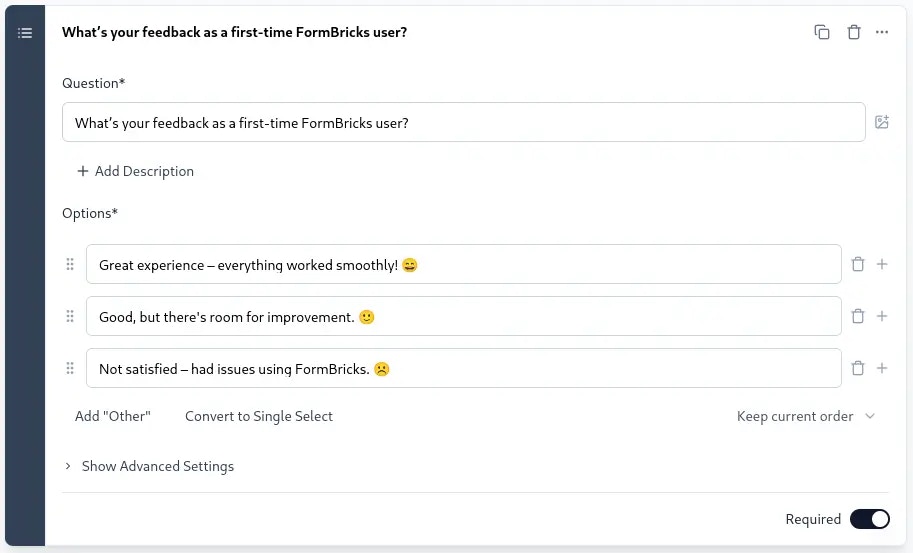 ### Title
Add a clear title to inform the respondent what information you are asking for.
### Description
Provide an optional description with further instructions.
### Options
Define the options shown in the list. These represent the items for which users will select.
Other than the fact that respondents can select multiple options, multi-select questions are similar to [single-select](/surveys/question-type/select-single) questions.
### Title
Add a clear title to inform the respondent what information you are asking for.
### Description
Provide an optional description with further instructions.
### Options
Define the options shown in the list. These represent the items for which users will select.
Other than the fact that respondents can select multiple options, multi-select questions are similar to [single-select](/surveys/question-type/select-single) questions.