

Looking for responses tied to a specific person? Use
Personal Links instead.Single-use links are anonymous. Formbricks limits each link to one response but does not know who
is behind it, so it is on you to track which link you sent to whom (a custom single-use ID makes
that easier).Personal links are generated for contacts in a segment. Each response is automatically attributed
to that contact, links can be given an expiry date, and the CSV export maps every link to a name
and email. Formbricks also blocks a second response from the same contact on its own, so you get
the one-response-per-person guarantee whether or not single-use links are switched on.
How a single-use link works
Every single-use link is your normal survey link plus a single-use ID (suId), and — depending
on the mode — a signature (suToken):
1
Validates the suId
The
suId must be one Formbricks issued for this survey. If it is missing, malformed, or
tampered with, the respondent sees a “This survey can only be taken by invitation” page and
cannot answer.2
Looks for an existing response
Formbricks checks whether a response with this
suId already exists for the survey.3
Serves, resumes, or blocks
No response yet → the survey opens. An unfinished response → it resumes where the respondent
left off. A finished response → they see “The survey has already been answered.”
A link is only spent once the response is finished. If a respondent drops off halfway, they
can reopen the same link and continue — they do not lose their answers and do not need a new
link.
suId is stored on the response, and the database enforces one response per suId per survey.
So even if two people open the same link at the same time, only the first submission is accepted.
Encrypted vs. custom single-use IDs
Single-use links come in two modes, controlled by the URL encryption of single-use ID toggle. Both are equally tamper-proof. The difference is who chooses the ID and whether it is readable.Create single-use links in the app
1
Open the share modal
On the survey summary page, click Share survey in the top right corner and go to the
Anonymous links tab.
2
Turn on Single-use links
Toggle Single-use links on and confirm.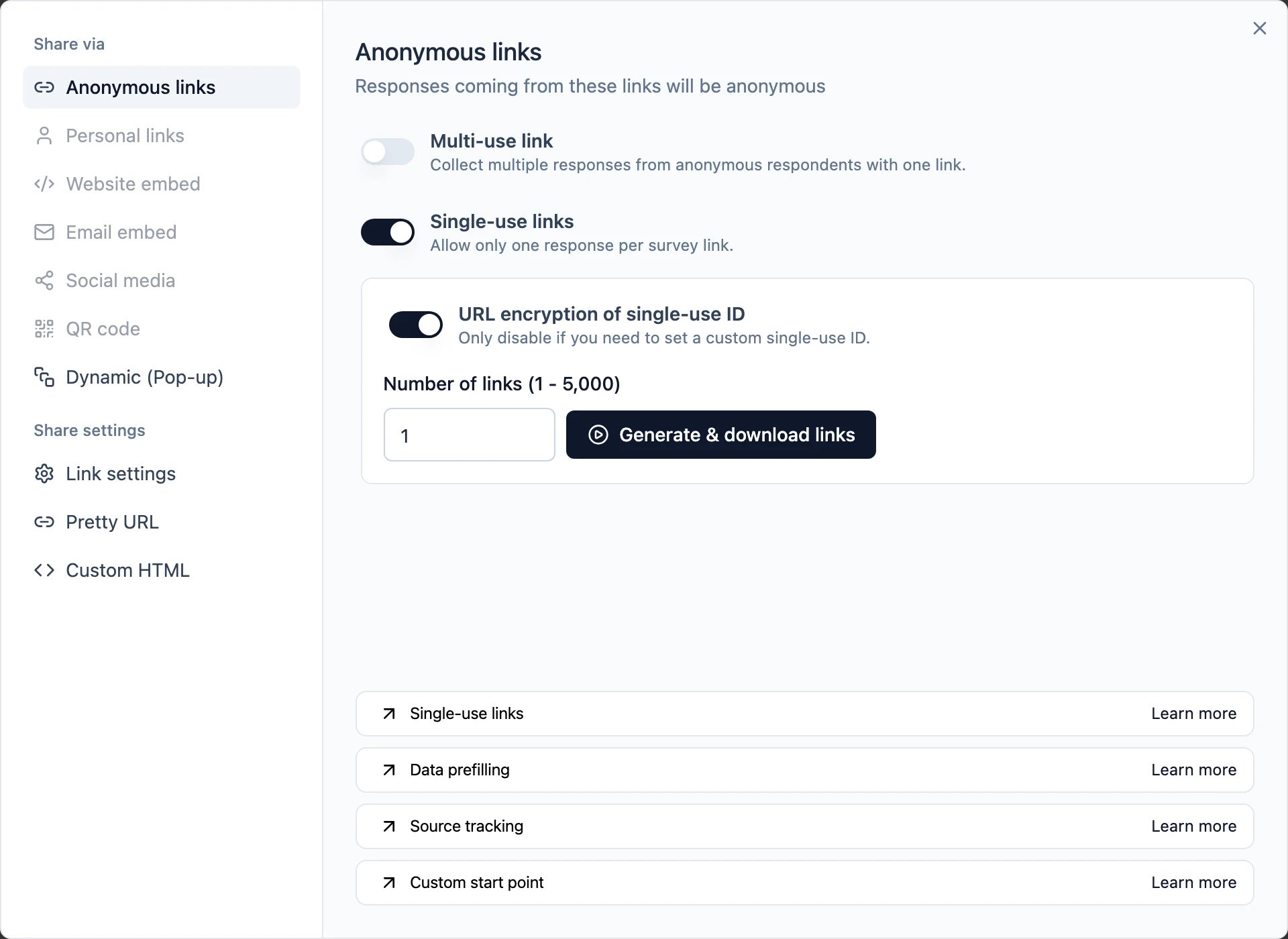
3
Generate a batch of links
URL encryption is on by default. Enter how many links you need (1–5,000) and click
Generate & download links. You get a CSV with one link per row.
4
Or set your own single-use ID
Turn URL encryption of single-use ID off, type your own ID (e.g. an invoice or customer
number), and click Copy to get the signed link for it.
Generate links via the API
To generate links programmatically — or more than the UI batch limit in one workflow — use the Management API:suId
plus its suToken. With encryption on, the suId is an encrypted blob and there is no suToken.
limitdefaults to10and accepts up to5000per call.- The survey must be a link survey with single-use links enabled, otherwise the endpoint returns a 400.
- The API key needs write access to the survey’s workspace. Even though this is a
GET, it mints links that can be used to submit responses, so read-only keys are rejected. - Links follow the survey’s encryption setting. With encryption off, each returned URL also carries
its
suToken.
Find the single-use ID of a response
Each response records thesuId it came from. In the responses table it appears as its own column,
and in the single response card you’ll see it in the metadata when hovering over the avatar:
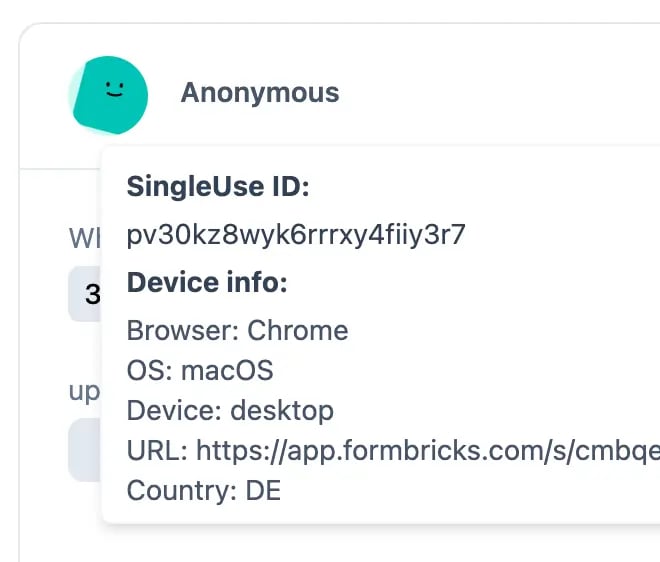
singleUseId field, which is how you
match a response back to the person you sent that link to.
Submitting responses programmatically
If you build your own survey frontend and post responses to the client API, a single-use survey requires two things in the request:singleUseIdin the request bodymeta.urlset to the full link the respondent opened, including itssuIdandsuToken
With URL encryption on, the
suId in the URL is encrypted while the API expects the decrypted
ID, which your backend cannot derive. For programmatic submission, turn URL encryption off and
use custom single-use IDs.Good to know
- Self-hosting: single-use links require
ENCRYPTION_KEYto be set. Rotating that key invalidates every single-use link that was already handed out. - Since Formbricks 5.0, unencrypted single-use links must carry a valid
suToken. Links generated before 5.0 without a token are rejected — regenerate them. - The “already answered” screen can be customized via the
singleUse.headingandsingleUse.subheadingfields on the survey in the Management API.