

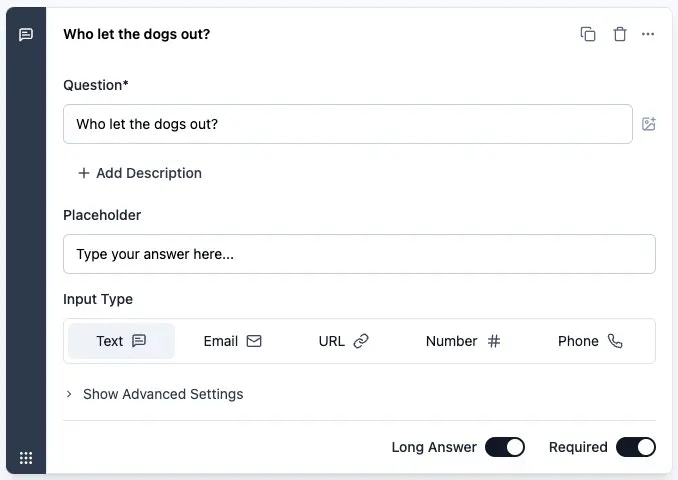
Free text questions allow respondents to enter a custom answer. Displays a title and an input field for the respondent to type in.Documentation Index
Fetch the complete documentation index at: https://formbricks.com/docs/llms.txt
Use this file to discover all available pages before exploring further.
Elements
Title
Add a clear title to inform the respondent what information you are asking for.Description
Provide an optional description with further instructions.Placeholder
Specify a placeholder text to display in the input field.Input Type
Choose the type of input field to display. Options include:- Text: A text area input. This can be converted to a single line input field if needed, by toggling the “Long answer” switch at the bottom of the question segment.
- Email: A single-line text input that validates the input as an email address.
- URL: A single-line text input that validates the input as a URL.
- Number: A single-line text input that validates the input as a number and shows “increase” and “decrease” buttons.
- Phone: A single-line text input that validates the input as a phone number.